The TA Automation Map: Recruiter's Guide to AI CV Screening in Europe (Part 2)
Your ATS probably has AI screening you never turned on. If it does not, you can build your own for under 40 euros a month. I mapped the tools, wrote the prompt, and checked what EU law says.
Tools, prompts, EU law, and what I would build for under 40 euros a month
This is Part 2 of my series mapping AI and automation across the recruitment funnel. The Intro is here. If you are new, the short version: I am a TA expert who got tired of feeling confused by the AI tooling landscape and decided to map it out, stage by stage, for recruiters and TA leaders working in or hiring into Europe.
The Recruiter And The CV Reviews
You know that moment when 47 new applications land on the weekend, and you have three, four…eight other roles open, two hiring managers chasing you for updates, and a phone screen in 20 minutes?
You scan CVs fast. You pattern-match. You skim for keywords, previous employers you recognise, job titles that look right. You move the obvious "no" pile out, send a few strong ones to the hiring manager (or to your TA Screen), and everything in between sits in limbo - “maybe”.
Recruiters call it the "maybe" pile. In some ATS platforms, candidates sit there for days, sometimes weeks. Hiring managers get sent a batch for review and do nothing with it. The recruiter follows up. The hiring manager says they will look at it this week. They do not. The candidate, who applied two weeks ago and heard nothing, takes another offer.
I have seen this pattern in every single company I have worked with or for. The tools are different, the ATS is different, the team size is different. The bottleneck is the same.
AI can now help with parts of this. But if you expect it to fix a broken intake process or educate a hiring manager who does not review candidates on time, you will be disappointed.
I tried to figure it out “can we make this easier for ourselves”? All the while staying out of prison for breaching the law? 😅 (I am joking, you won’t go to jail, just the Monopoly Jail for which someone has to pay hefty money to get you out of)
Check your ATS first: you might already have AI screening"
Before you buy anything new or build anything from scratch, check what you already have.
Most modern ATS platforms (and by modern I mean anything launched or significantly updated in the last three years) now include some form of AI-assisted screening. The specifics vary, but the pattern is similar: the system compares incoming applications against criteria you define when you open the role, then categorises or scores each candidate by match level.
Some use match-level categories (strong match, possible match, unlikely match). Some assign numerical scores. Some highlight evidence in the candidate's profile to explain the rating.
The key word here is criteria you define. If you walked out of the intake meeting with vague requirements ("someone senior with good communication skills and culture fit"), the AI has nothing solid to work with. It will score badly because you fed it badly.
Two things to check in your ATS today:
First, have you turned on the AI features? A surprising number of teams I work with pay for an ATS that has screening capabilities built in, and nobody configured them. That is free improvement sitting on the shelf.
Second, does your intake process produce clear, weighted criteria? If it does not, fix that before you touch any AI tooling. The AI multiplies the quality of whatever it receives. If that quality is low, the output is useless.
And a third - bonus - you need to prompt the AI yourself, properly for it to be able to analyse the CVs properly.
The CV screening tools landscape
I am not going to give you an exhaustive product directory. The market moves monthly, and half of what I list today will have been acquired, renamed, or sunset by the time you read this.
Here are the ones I keep seeing in research. All of these do the specific thing this article is about: read inbound CVs and score them against your role criteria. There are dozens of tools that sit on top of your ATS and handle screening, scoring, or both. I encourage you to run your own research. I have no partnerships or affiliate arrangements with any of these companies
GoPerfect connects to over 60 ATS platforms, scores every applicant 1 to 5 with written reasoning, and auto-triages them (approve above 4.0, decline below 3.0, hold the middle for human review). It also does outbound sourcing in the same platform.
HiredScore (now part of Workday) grades applicants A through D. If your company uses Workday, this may already be available to you. It also integrates with SmartRecruiters, iCIMS, SAP SuccessFactors, and Oracle Taleo.
Eightfold AI uses deep learning on 1.5 billion career profiles to match candidates by skills and career trajectory. Enterprise-tier, heavy implementation.
Gem AI App Review ranks inbound applications against your criteria with an explainable match score. Document-based screening only. If you already use Gem for sourcing, it keeps everything in one place.
If you have seen tools like Metaview, BrightHire, HireVue, or Clovers on "screening tools" lists: those are interview-stage tools, not application review tools. I will cover them later in this series.
Before you sign anything, ask every vendor: Where is candidate data stored? Can you show me your Data Processing Agreement? What have you done to prepare for the EU AI Act's high-risk classification of recruitment AI?
If they cannot answer all three clearly, Huston we got a problem 😎
A screening prompt you can test in 10 minutes
Before you build any automation, test whether AI screening is useful for your roles. Open Claude or ChatGPT, and try the following.
First, strip identifying details from the CV: remove the candidate's name, address, date of birth, photo, and any other personal identifiers. This reduces bias in the assessment and limits the personal data you send to the AI. If you are using the API in an automated workflow later, build this stripping step into the process.
Then paste this prompt, adjusted for your role:
You are assessing a candidate for [Role Title] at [Company type, e.g. "a 200-person B2B SaaS company"]. Below are the screening criteria from our intake meeting, followed by the candidate's CV with personal details removed.
Your job is to look for evidence of capability, not keyword matches. Candidates describe their experience in different ways. Someone who writes "strategic account management" may have the same skills as someone who writes "enterprise sales." Someone who managed "Projektsteuerung" has done project management. Evaluate what the candidate has done, not whether they used the same words as the job description.
MUST-HAVE CRITERIA (the role cannot succeed without these):
1. [Describe the competency, not just the keyword. E.g. "Experience selling complex, high-value products or services to enterprise buyers, demonstrated through deal sizes, sales cycles, or account complexity. This might appear as enterprise sales, key account management, strategic partnerships, or business development in B2B contexts."]
2. [E.g. "Working proficiency in German at C1 or C2 level. Valid indicators: explicit proficiency statement on CV, language certifications (Goethe-Zertifikat, TestDaF), CV written in German with education completed in a German-speaking country, or professional content created in German. Working in Germany alone is not sufficient evidence."]
3. [E.g. "At least 2 years of experience in a relevant context such as SaaS, technology, or subscription-based business models. Accept adjacent industries if the candidate demonstrates understanding of recurring revenue models, customer lifecycle, or similar dynamics."]
NICE-TO-HAVE CRITERIA (these strengthen a candidate but are not disqualifying):
1. [E.g. "Experience with CRM platforms (Salesforce, HubSpot, Pipedrive, or equivalent). The category of tool matters, not the specific brand."]
2. [E.g. "Background at a company in a growth stage (Series A to Series C, or scaling from 50 to 500 employees). Indicators include references to rapid team growth, building processes from scratch, or wearing multiple hats."]
FOR EACH CRITERION, state: - Whether there is evidence for it in the CV (yes, partial, or no) - What specific experience from the CV supports your assessment - If partial or no: what is missing, and could adjacent experience compensate?
Then give an overall assessment: STRONG MATCH (meets all must-haves with clear evidence), POSSIBLE MATCH (meets most must-haves, gaps may be closeable), or UNLIKELY MATCH (missing multiple must-haves with no adjacent evidence).
Candidate CV (personal details removed):
[Paste CV text here]
Try this with 5 CVs from a recent role where you already know who you progressed and who you rejected. Compare the AI's assessments to your own decisions. If the overlap is high, the approach works for that role type. If the AI misses things you catch, the criteria need sharpening. Iterate on the must-have descriptions until the AI's reasoning matches what a good recruiter would think.
This takes ten minutes and costs nothing beyond your existing subscription. Do this before you invest any time in automation.
Build your own: AI screening with Claude, n8n, and Slack for under 40 euros a month
This is the part I find most interesting, and the part where I am still learning. I have tested some of these workflows. Others I have researched and mapped out but not built end-to-end. I am sharing what I have found so far, and I expect / want that people who know more about automation to correct me where I get things wrong.
The setup I am considering: an ATS (any ATS with API and webhook support), Claude (Pro or Team plan), n8n (open-source automation, self-hosted or cloud), and Slack.
The daily candidate digest
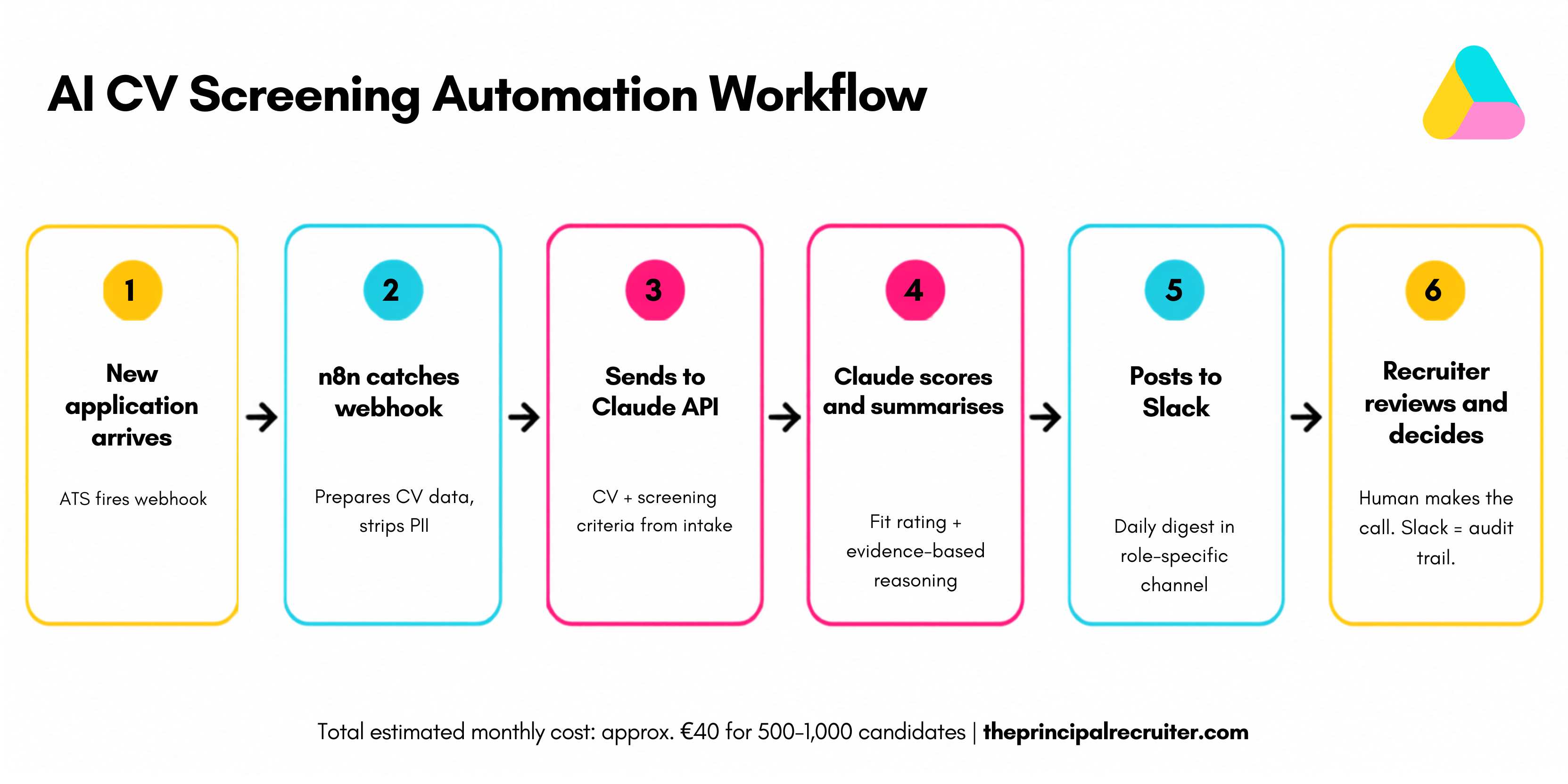
Every morning, n8n pulls new applications from the past 24 hours via your ATS API.
The setup: an ATS with API and webhook support, Claude's API (commercial terms, which include the DPA), n8n (open-source automation, free if self-hosted or roughly 20 euros per month on n8n cloud), and Slack.
It sends the batch to Claude's API with a prompt that includes the role's requirements (from your intake meeting) and asks Claude to write a two-sentence summary for each candidate, explaining how they match or do not match the criteria.
Claude returns the summaries and, dependent on your prompt, a match-score. n8n posts them to a dedicated Slack channel for that role (between you and your HM for example). The recruiter and hiring manager both see the same digest, in plain language, without anyone needing to log into the ATS.
Two things happen here: the hiring manager gets visibility without navigating the ATS (which most of them hate doing), and you create a paper trail of AI-assisted reasoning that sits in Slack. That second part matters for compliance, and I will come back to it.
Killing the "maybe" pile
The candidate sits in a "maybe" or "hiring manager review" stage in your ATS.
Setup: one n8n workflow with a webhook trigger, a Slack message node, a wait node, a conditional check, and a second Slack message or ATS API call. A couple of hours if you know n8n. Half a day if you are learning.
Your ATS fires a webhook. n8n catches it and posts a Slack message tagging the hiring manager: "New candidate for review. You have 48 hours before this candidate moves to 'No HM response' and the recruiter proceeds"
After 48 hours with no action, n8n fires a follow-up.
After a total 72 hours, it moves the candidate to a different status and notifies the recruiter. The recruiter makes the call.
You are setting a standard / default: review the candidate, or lose it. Some hiring managers will push back on this. This now goes into Stakeholder Management territory and that is not what this article is about. But having the automation in place makes the problem visible and measurable, which is half the battle.
Someone told me one day “there is no such thing as “I do not know", anything I need is one Claude prompt away”. Remember that.
Personalised candidate prep documents
When a candidate passes screening and moves to the TA screen stage, n8n catches the webhook and triggers Claude to generate a personalised prep document.
It includes what the interview will cover, what to prepare, background on the company, and who they will be speaking with (or really whatever you want it to include)
You can send this as a plain email via n8n, or host it as a simple web page (Lovable, Replit, or even a Notion page) that looks branded and professional.
This is partly a candidate experience play. It signals that a human is paying attention, even when parts of the screening were AI-assisted.
What this costs
The Claude API charges per token (roughly per word). Using Claude Haiku 4.5, the cheapest current model, screening 200 CVs costs approximately 1 euro in API fees. Using Claude Sonnet 4.6, which is smarter but pricier, the same batch costs roughly 2 to 3 euros. If you use prompt caching (sending the role criteria once and reusing them across all CVs in the batch), input costs drop by up to 90%.
n8n cloud hosting runs about 20 euros per month. Self-hosted on your own server is free. Slack's free tier is sufficient.
Total monthly cost for a team screening 500 to 1,000 candidates across multiple roles: somewhere between 25 and 40 euros per month. Compare that to dedicated screening tools at 39 to 199 dollars per month, or enterprise platforms at 35,000 dollars per year.
The trade-off is not cost. It is the compliance and maintenance work you take on when you build it yourself, which I cover in the next section.
GDPR, the EU AI Act, and your DIY screening setup
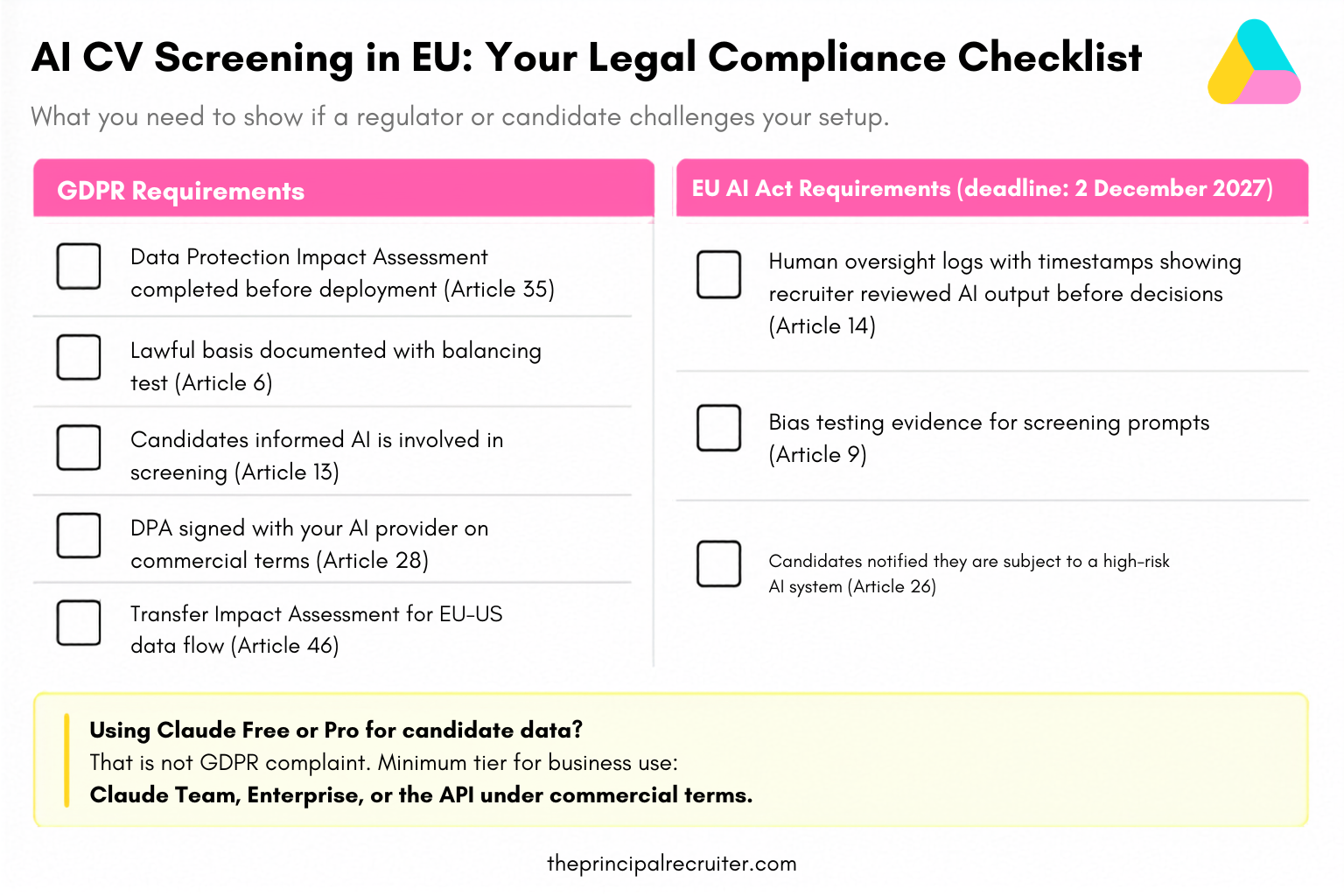
Sending candidate CVs to an AI via an API is processing personal data. In Europe, that triggers specific legal obligations. I am not a lawyer, but I have mapped the articles that apply to this exact setup (n8n + Claude API for screening). Verify these with your legal team.
GDPR
You need a lawful basis to process candidate data through AI. Legitimate interest (Article 6(1)(f)) is the most commonly cited basis for recruitment screening. You need to document the balancing test.
You must tell candidates AI is involved before or at the point of application (Article 13). A line in the job posting or application acknowledgement is the minimum.
Candidates have the right not to be subject to purely automated decisions that significantly affect them (Article 22). If Claude scores and a recruiter reviews before any decision becomes final, you are likely ok. If n8n auto-rejects candidates below a score threshold with no human review, you can get in trouble.
You must carry out a Data Protection Impact Assessment before you start (Article 35). AI recruitment screening is high-risk processing. Skipping the DPIA is the first thing a regulator will look for.
Anthropic is your data processor. Their DPA with Standard Contractual Clauses is automatically incorporated into their commercial terms (Article 28; Anthropic DPA). Critical: this applies to commercial products (API, Team, Enterprise). Claude Free and Claude Pro are consumer products. Using them for candidate data is not defensible.
EU AI Act
AI used to screen, filter, or rank candidates is classified as high-risk under Article 6(2) and Annex III, point 4(a). This covers DIY setups, not just vendor products.
You must have a risk management system with documented bias testing (Article 9), transparency so you can interpret outputs (Article 13), human oversight where a person can understand, override, or reverse the AI (Article 14), and as a deployer, you must monitor the system, keep logs, and inform candidates (Article 26).
Penalties for non-compliance: up to 35 million euros or 7% of global annual turnover.
The compliance deadline for standalone high-risk systems was 2 August 2026. On 7 May 2026, EU lawmakers deferred this to 2 December 2027. Treat that as preparation time, not permission to ignore it.
What you would need to show if someone challenged you
If a candidate or regulator questioned your DIY screening system, you would need to produce: your DPIA (written before deployment, not after), your lawful basis documentation, proof candidates were told AI was involved, your DPA with Anthropic, a Transfer Impact Assessment for the EU-US data flow, logs showing a human reviewed the AI's output before decisions became final (with timestamps and names, not just a policy document), and evidence you tested your prompts for bias before going live.
A Slack channel with the daily candidate digest and a record of recruiter decisions is an audit trail.
A vendor product would handle some of this for you. When you build your own, you own the entire compliance layer. That is the trade-off.
AI CV Screening Applicability
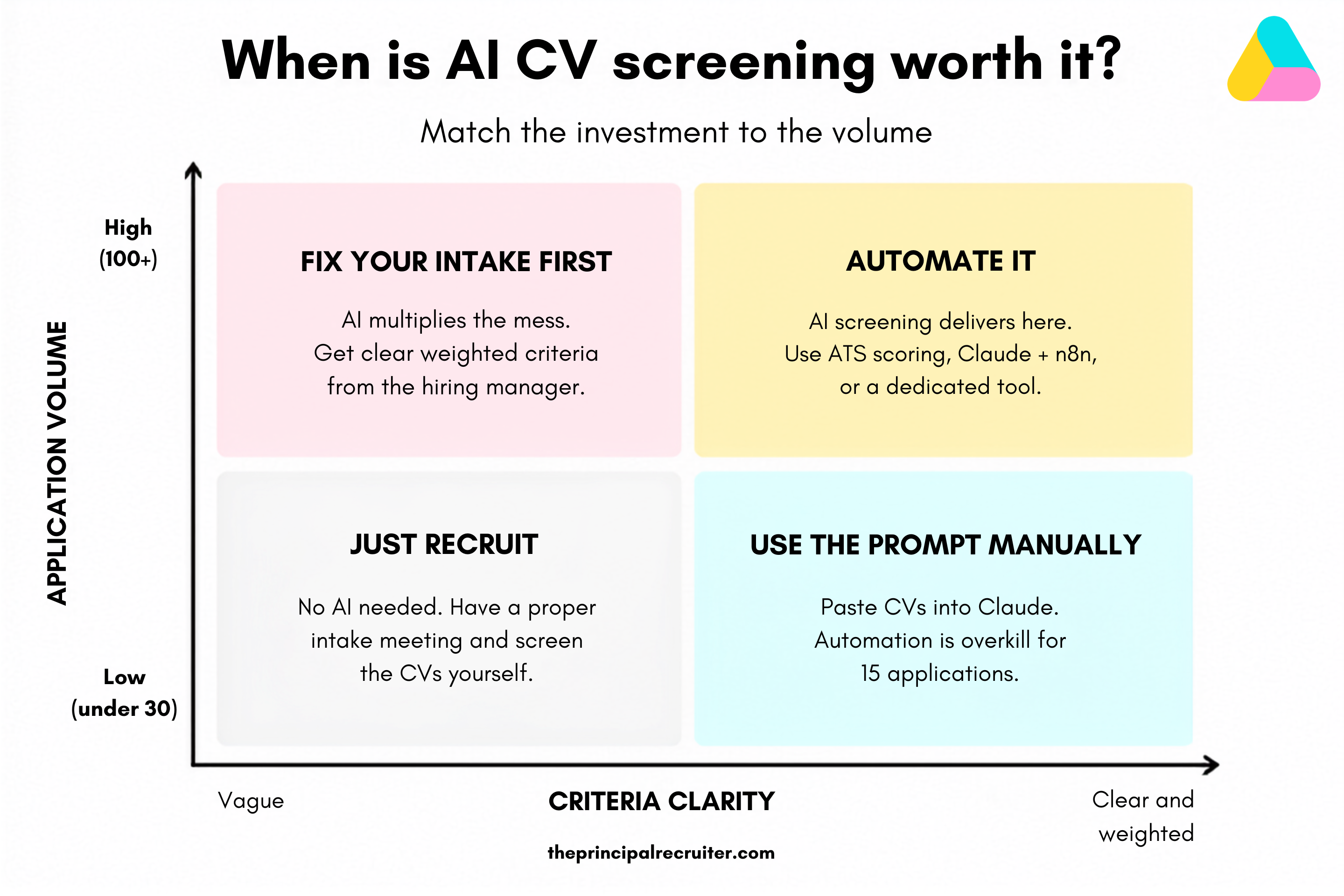
AI screening is most useful for volume roles. A Customer Support role with 300 applicants needs AI scoring. A VP of Finance search with 12 applicants does not. Match the investment to the volume. Do not sell yourself (or your company) a screening automation for a role you will fill through your network.
The intake meeting is the bottleneck. I keep coming back to this because it is true across every company I have seen (as Internal or Consultant). If the recruiter and hiring manager did not align on clear, specific, weighted criteria before the role went live, the AI has nothing solid to screen against.
The "maybe" pile is a relationship problem. The n8n timed nudge I described above is a forcing function, but the real fix is setting expectations in the intake meeting, before a single candidate applies.
If you build it yourself, you own the compliance burden. A vendor product comes with a DPA, documentation, and (sometimes) bias testing. If you build your own screening workflow with Claude and n8n, you need to create that compliance layer from scratch: test your prompts for bias, document the process, keep logs.
Candidate experience matters more than efficiency gains. If candidates feel they are being judged by a black box, trust drops. Be transparent about AI involvement. The personalised prep document I described earlier is one way to signal that a human is paying attention, even when the screening was partly automated.
What I would do if I were starting from scratch tomorrow
If I walked into a company with a small TA team, 30 open roles per year, an ATS, and Slack:
Audit (EVERYGTHING and) the intake process. Are criteria for each role clear, specific, and weighted? Fix this before touching any tools.
Check what the ATS already does. Turn on native AI features, configure them properly. That is free.
Build the Slack nudge workflow in n8n. Less than half a day of setup, solves the hiring manager bottleneck for every role going forward.
Test the daily candidate digest on one high-volume role. Run it for two weeks, iterate based on whether the recruiter and hiring manager find it useful.
Do not buy a dedicated screening tool unless the company hires more than 100 people per year. Below that, the ATS plus Claude plus n8n covers 70 to 80% of what the expensive platforms do.
Next in the series: Sourcing. The stage where everyone tells recruiters to "source more" without asking whether they are sourcing in the right places, with the right tools, in a way that complies with EU law.
If this was useful, follow along. If you spot something I got wrong, tell me. I would rather be corrected than confident and wrong.

Founder of The Principal Recruiter. 16+ years in talent acquisition. Building stronger hiring systems worldwide.